


work directly
with labs
track
patient testing
easily
download result
Not all healthcare providers will use LabDash in the same ways or for the same reason.
Ideal for community testing of COVID-19. Hosting events such as drive through testing or pop-up clinics.

Care providers who are looking to test large groups of people for COVID-19. This may be hospitals or other groups organizing large scale testing events.

Schools looking to test groups for COVID-19.



Primary care physicians and other physician specialty groups who provide COVID-19 testing.

This includes facilities such as elderly care facilities, assisted living for long-term care, or assisted living memory care.

Testing individual sports teams for COVID-19.
The following is a guide of how to use LabDash as a provider.

Once you have registered as a provider, the lab needs to verify your account. The lab will reach out at this point, if they haven’t already. A lab representative will help you to determine how you will incorporate LabDash into your testing process.

Once you have registered as a provider, the lab needs to verify your account. The lab will reach out at this point, if they haven’t already.
BEFORE starting the test, follow these important steps.
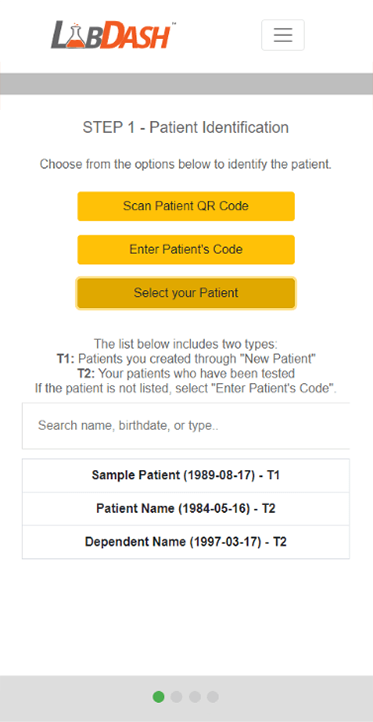
Identify who is getting tested by clicking “Collect” under their name.
The “Next” button will then appear - click it to continue.
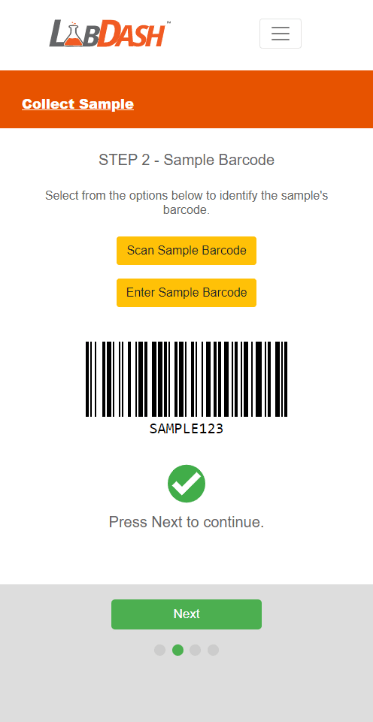
Scan or enter the barcode from your test kit. (Note: scanning may not be available on your device.)
Once the barcode is verified, the “Next” button appears - click it to continue.
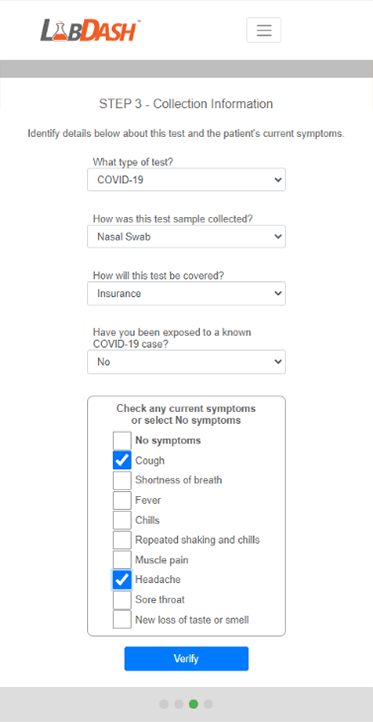
Enter your test type, test method, exposure, and symptoms.
When you are finished, click “Submit” to complete this step.
The “Next” button will then appear - click it to continue.
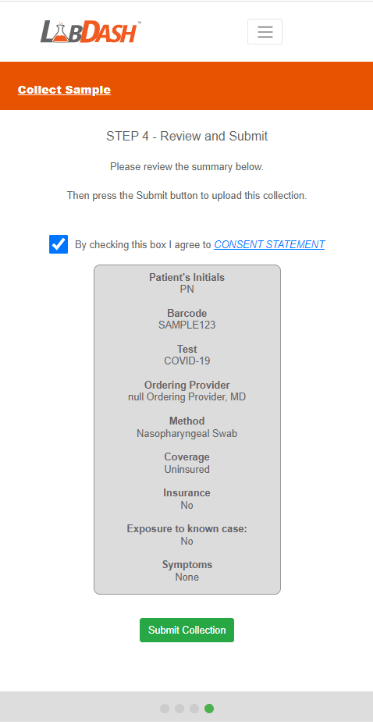
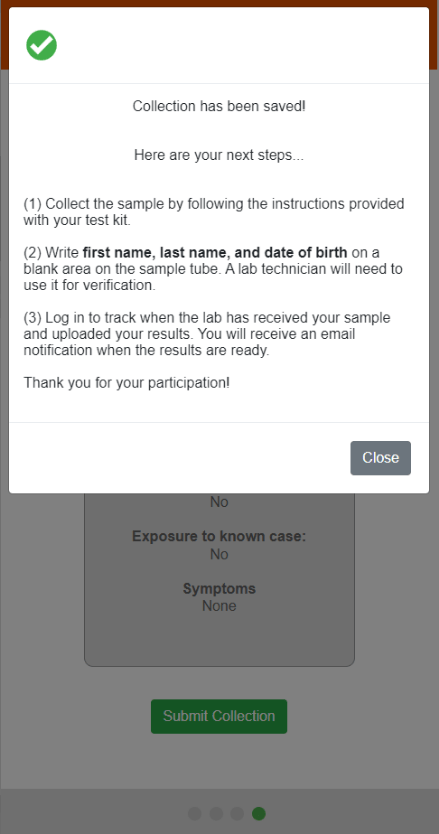
Review your collection information and make sure it is correct.
Click “Submit Collection” to enter this information into LabDash. This is what will connect your sample barcode to your account.
Now you are ready to collect your sample.
You have completed the steps above. The following are important steps to take your test and ensure that the lab receives your kit correctly.
Once you have registered as a provider, the lab needs to verify your account. The lab will reach out at this point, if they haven’t already.
A lab representative will help you to determine how you will incorporate LabDash into your testing process.

Once you have registered as a provider, the lab needs to verify your account. The lab will reach out at this point, if they haven’t already.
A lab representative will help you to determine how you will incorporate LabDash into your testing process.
BEFORE starting the test, follow these important steps.
Identify who is getting tested by clicking “Collect” under their name.
The “Next” button will then appear - click it to continue.
Scan or enter the barcode from your test kit. (Note: scanning may not be available on your device.)
Once the barcode is verified, the “Next” button appears - click it to continue.
Enter your test type, test method, exposure, and symptoms.
When you are finished, click “Submit” to complete this step.
The “Next” button will then appear - click it to continue.
Review your collection information and make sure it is correct.
Click “Submit Collection” to enter this information into LabDash. This is what will connect your sample barcode to your account.
Now you are ready to collect your sample.
You have completed the steps above. The following are important steps to take your test and ensure that the lab receives your kit correctly.
Once you have registered as a provider, the lab needs to verify your account. The lab will reach out at this point, if they haven’t already.
A lab representative will help you to determine how you will incorporate LabDash into your testing process.
Once you have registered as a provider, the lab needs to verify your account. The lab will reach out at this point, if they haven’t already.
A lab representative will help you to determine how you will incorporate LabDash into your testing process.
Lorem Ipsum is simply dummy text of the printing and typesetting industry. Lorem Ipsum has been the industry’s standard dummy text ever since the 1500s,
ABCD6
Lorem Ipsum is simply dummy text of the printing and typesetting industry. Lorem Ipsum has been the industry’s standard dummy text ever since the 1500s,
ABCD5
Lorem Ipsum is simply dummy text of the printing and typesetting industry. Lorem Ipsum has been the industry’s standard dummy text ever since the 1500s,
ABCD4
Lorem Ipsum is simply dummy text of the printing and typesetting industry. Lorem Ipsum has been the industry’s standard dummy text ever since the 1500s,
ABCD3
Lorem Ipsum is simply dummy text of the printing and typesetting industry. Lorem Ipsum has been the industry’s standard dummy text ever since the 1500s,
ABCD2
Lorem Ipsum is simply dummy text of the printing and typesetting industry. Lorem Ipsum has been the industry’s standard dummy text ever since the 1500s,
ABCD